
TABLE OF CONTENTS
This article will introduce the controls, interfaces, and LED status lights of the WiiM Vibelink Amp.
Front Panel Controls and Lights
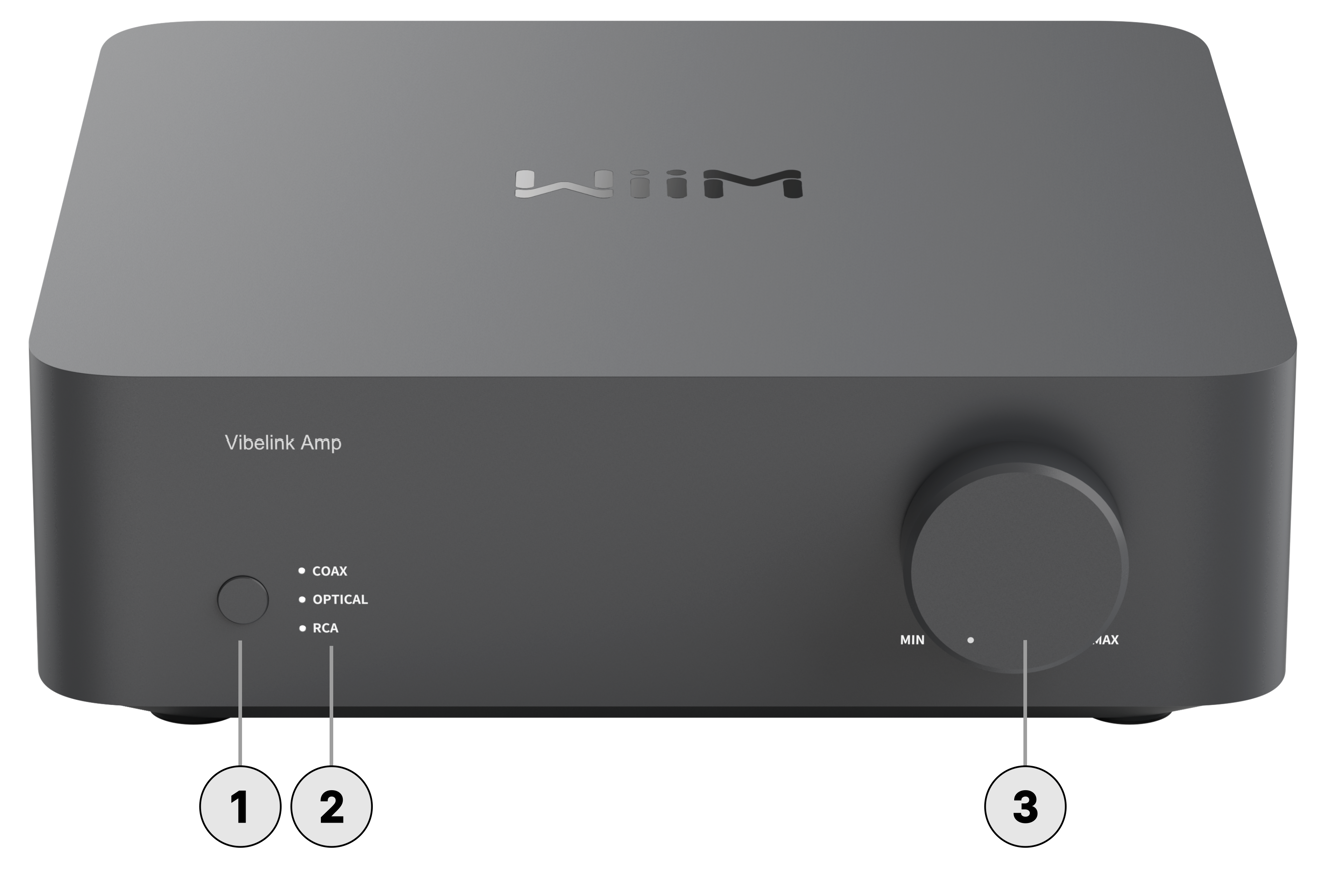
Each numbered control or light on the front panel is explained below:
| Icon | Control | Description |
|---|---|---|
 | Mode Switch | Press to switch the input mode between Coax, Optical, and RCA. |
 | LED Indicators | Three RGB LEDs indicate source input and device status. For more information, see LED Status Lights. |
 | Volume Knob | Rotate to adjust the volume level, with an indicator showing the current level. |
Back Panel Controls and Interfaces
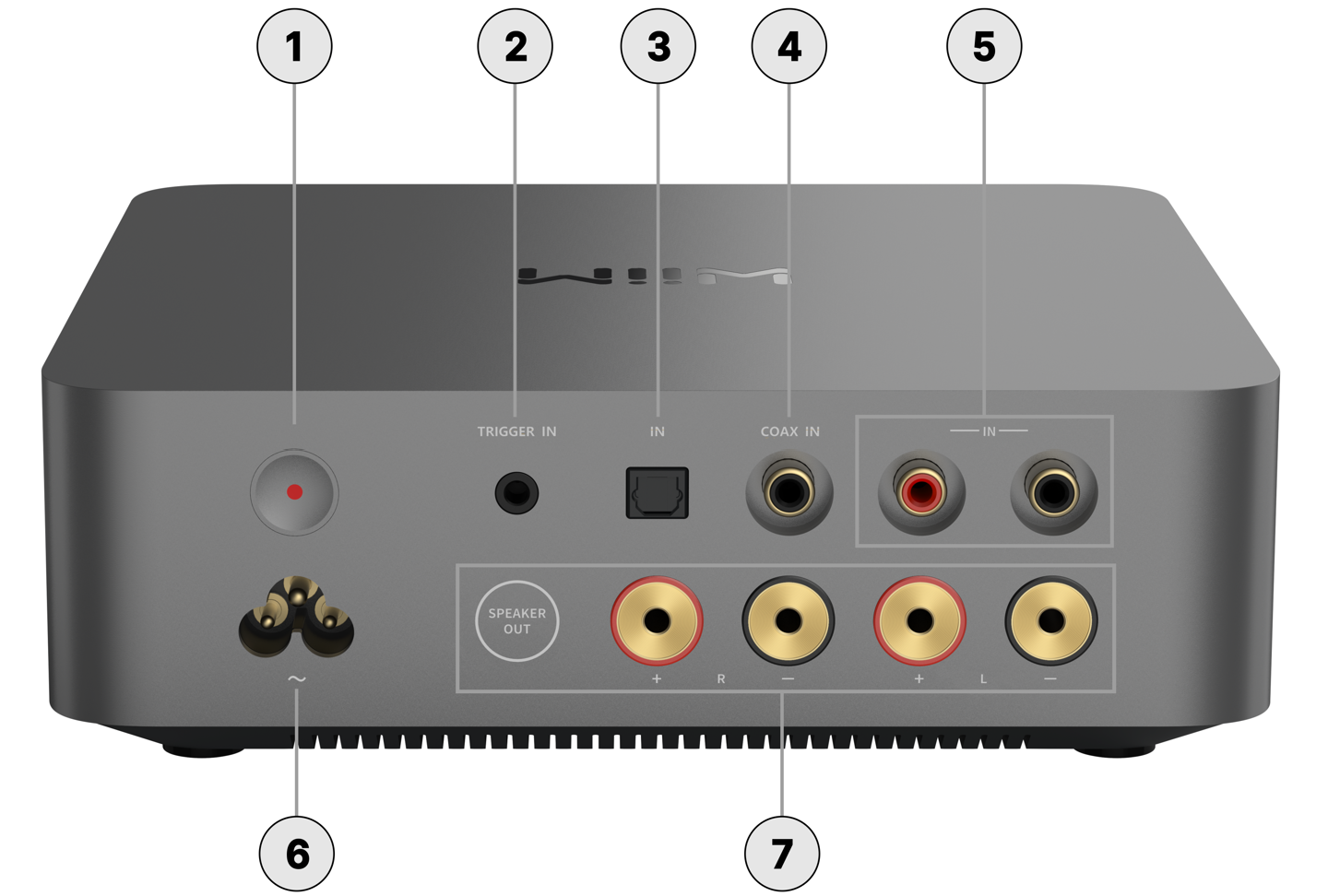
Each numbered control or interface on the back panel is explained below:
| Icon | Interface | Description |
|---|---|---|
 | Standby |
|
 | 12V Trigger In | Allows a connected device (e.g., a WiiM Ultra) to automatically place the WiiM Vibelink Amp into standby mode or wake it up. |
 | Optical In | For connecting digital audio sources (e.g., a WiiM Mini, WiiM Pro, WiiM Ultra, or TV) using an optical cable. |
 | COAX In | For connecting digital audio sources (e.g., a WiiM Pro or WiiM Ultra) using a coaxial cable. |
 | RCA In | Two RCA jacks (red and black) for connecting analog audio sources (e.g., a WiiM Pro, WiiM Ultra, or CD player) with an RCA cable. |
 | Power Input | 100-240V AC, 50/60Hz, 3A Max |
 | Speaker Output | Four speaker out jacks (R+, R-, L+, L-) to connect passive speakers using banana plugs, spade connectors, or bare wire. |
Standby Mode
The WiiM Vibelink Amp can enter standby mode in three ways to reduce power consumption:
- Standby Button: Press the standby button on the device.
- Auto-Standby: Automatically enter standby mode after 30 minutes of inactivity.
- 12V Trigger In: Enters standby when triggered by a connected device.
Note: In standby mode, the WiiM Vibelink Amp's LED indicator dims to half brightness.
Sleep Mode
For maximum power saving, the WiiM Vibelink Amp can enter sleep mode, dropping power consumption to an ultra-low 0.5 W.
You can manage sleep mode and wake up the WiiM Vibelink Amp in two ways:
- WiiM Home App: You can manually put the device into sleep mode and wake it up directly through the app. For details, see How to Manage Your WiiM Vibelink Amp Using the WiiM Home App.
- Auto-Sleep via 12V Trigger In: Once entering standby via Trigger In, the device will automatically switch to sleep mode after remaining in standby for 30 minutes. It will also automatically wake up from sleep mode when an active trigger signal is detected.
Note: In sleep mode, the WiiM Vibelink Amp's LED indicator turns off completely.
LED Status Lights
| LED Color/Pattern | Status/Behavior | |
|---|---|---|
| Flashing White on Coax Mode |  | Boot-up |
| Solid Light Green |  | RCA-in mode |
| Solid Orange |  | Optical-in mode |
| Solid Purple |  | Coax-in mode |
| Flashing White and Green on Current Input Mode |  | OTA update |
| Flashing White and Red on Current Input Mode |  | Restore to factory settings |
| Flashing Red on Current Input Mode |  | Hardware error |