
TABLE OF CONTENTS
The WiiM Amp and WiiM Amp Pro feature Sub Out, allowing you to connect an active subwoofer for deep and resonant bass. In addition, it offers a series of subwoofer output settings, allowing you to tailor the bass response based on your preference and room acoustics.
This tutorial will guide you on how to connect your subwoofer with your WiiM Amp or WiiM Amp Pro, and configure the subwoofer output settings.
Step-by-Step Guide
Step 1: Identify the Subwoofer Output
Locate the SUB OUT port on your WiiM Amp or WiiM Amp Pro, which is clearly labeled on the back panel.

Step 2: Connect the Subwoofer
Follow these instructions to connect the subwoofer:
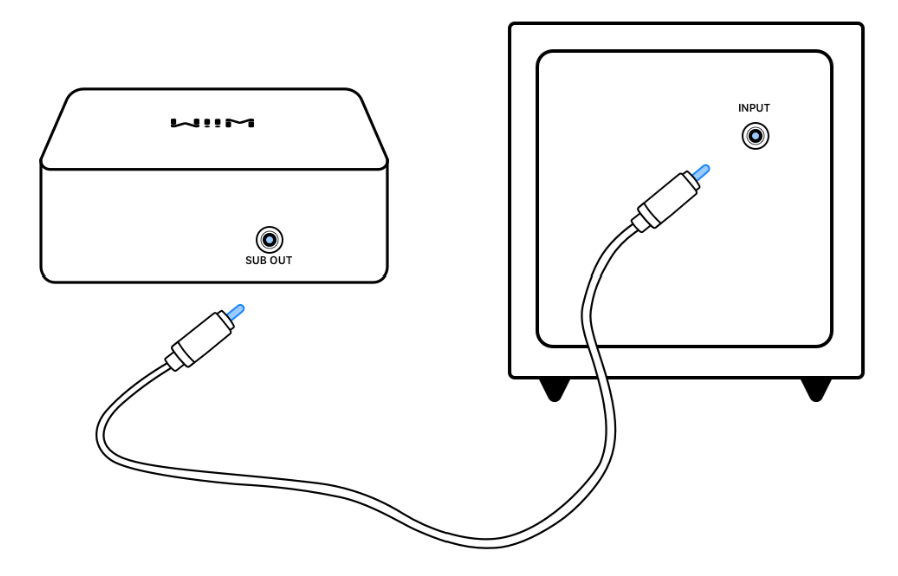
- Connect one end of an RCA cable to the SUB OUT port on your WiiM Amp or WiiM Amp Pro.
- Attach the other end of the RCA cable to the input on your powered subwoofer. If your subwoofer has two RCA inputs, opt for the one marked LFE or Mono.
Step 3: Power Up
Turn on your subwoofer first, then power up your WiiM Amp or WiiM Amp Pro.
Step 4: Adjust Your Subwoofer
Follow these instructions to adjust your subwoofer:
- Set your subwoofer's volume to its midpoint.
- Set the crossover on your subwoofer to its highest frequency. Your WiiM Amp or WiiM Amp Pro will control the crossover frequency.
- Position the phase control to 0 degrees.
Step 5: Configure WiiM's Subwoofer Output
Follow these steps to configure your WiiM device's subwoofer output in the WiiM Home app:
- Open the WiiM Home app.
- Navigate to the Devices tab > Device Settings
 > Sub Out.
 - Toggle on Sub Output to activate the subwoofer output.Note: A series of Sub Out settings will automatically appear, allowing you to fine-tune subwoofer output.
- Select Subwoofer & Speaker Sync to align the time delay between your subwoofer and main speakers. For more details, see Tutorial: Syncing Your Subwoofer with Main Speakers. Tip: Syncing the subwoofer with the main speakers is key to achieving clear, balanced, and powerful bass, enhancing the overall sound experience for music, movies, and games. It should be prioritized during audio system setup for the best sound quality.
Tips for Optimal Sound
For detailed information about Sub Out settings, see Introducing Sub Out Settings.
For how to fine-tune subwoofer for optimal sound, refer to Tutorial: Tuning Subwoofer Settings on WiiM Devices for Optimal Sound Quality.
Troubleshooting
If your subwoofer is not producing sound, see Troubleshooting: How to Resolve Subwoofer No Sound Issues for solutions.