
WiiM devices support bit-perfect digital output via optical and coaxial connections, with support for up to 192 kHz / 24-bit audio.
What Does “Bit-Perfect” Mean?
When bit-perfect output is enabled on a WiiM device, the device outputs audio using the same bit depth and sample rate as the original music source, without upsampling or downsampling.
For example:
- A 24-bit / 192 kHz source is output as 24-bit / 192 kHz
- A 16-bit / 48 kHz source is output as 16-bit / 48 kHz
For detailed instructions, see How to Set Up Bit-Perfect Playback on WiiM Devices.
How to Set Optical/COAX Output Resolution on a WiiM Device
Your downstream optical or coaxial receiver (such as a DAC or amplifier) must support the selected bit depth and sample rate. To ensure compatibility with older optical/coaxial receivers, the default output setting is 48 kHz / 16-bit.
You can manually adjust it the WiiM Home app to match your setup:
Open the WiiM Home app
Go to the Devices tab.
Tap the Device Settings icon
 .
.Select Audio Settings.
Open Optical Output Resolution or COAX Output Resolution.

Choose your desired sample rate and bit depth for the optical or COAX output.
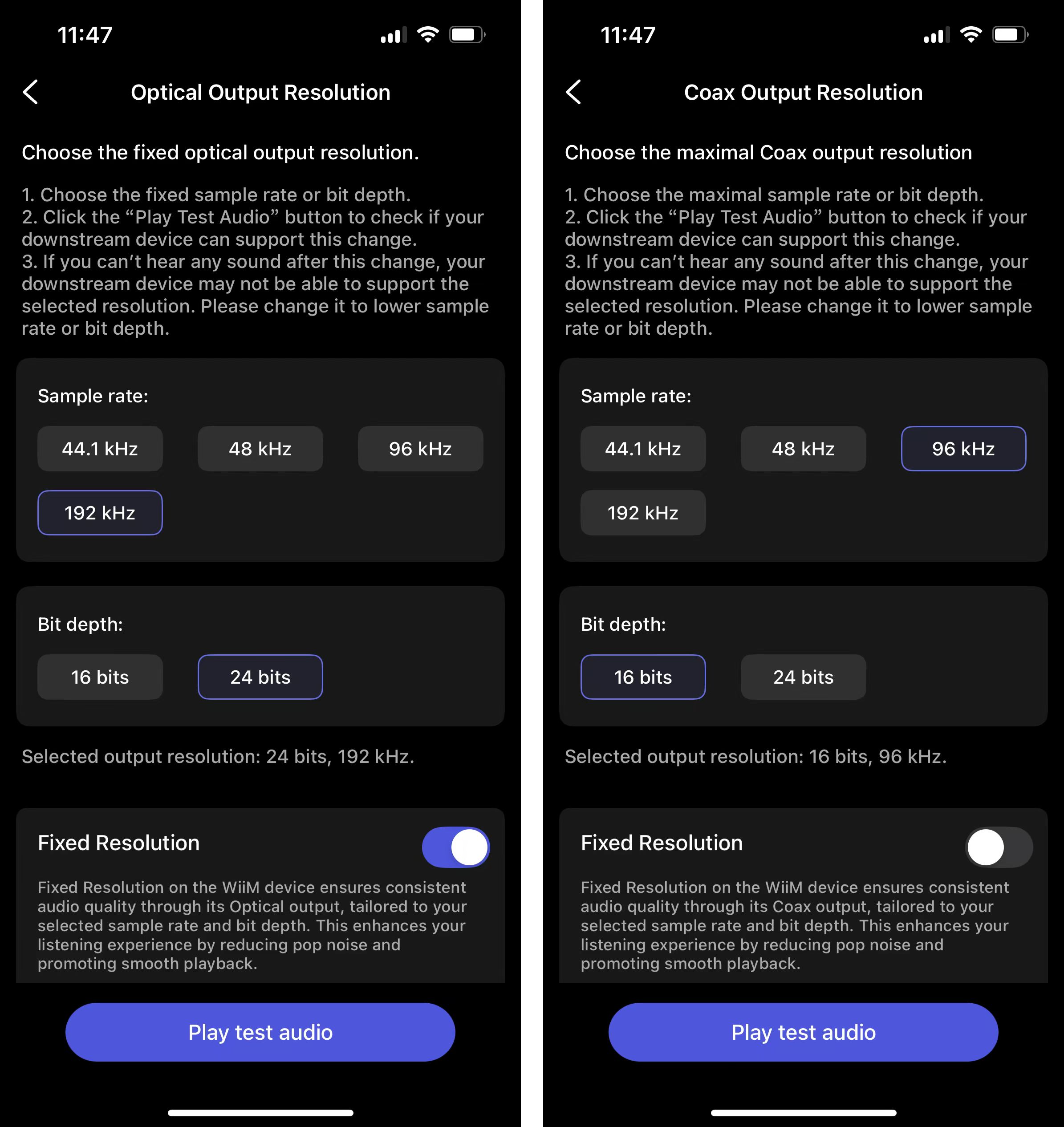
Play the test audio to confirm your downstream device supports the selected format.